"Al makes you faster at generating options. Design thinking makes you better at choosing the right one."

"I believe great design comes with responsibility. As AI becomes woven into creative workflows, I've committed to learning prompt engineering deeply, not just to work smarter, but to work sustainably. Knowing that AI infrastructure demands significant energy and water resources, I engineer my prompts to be precise and complete from the start, because good design should never cost the earth."
AI-Powered Marketing Agent
Custom Claude API Integration for Digital Product Creator
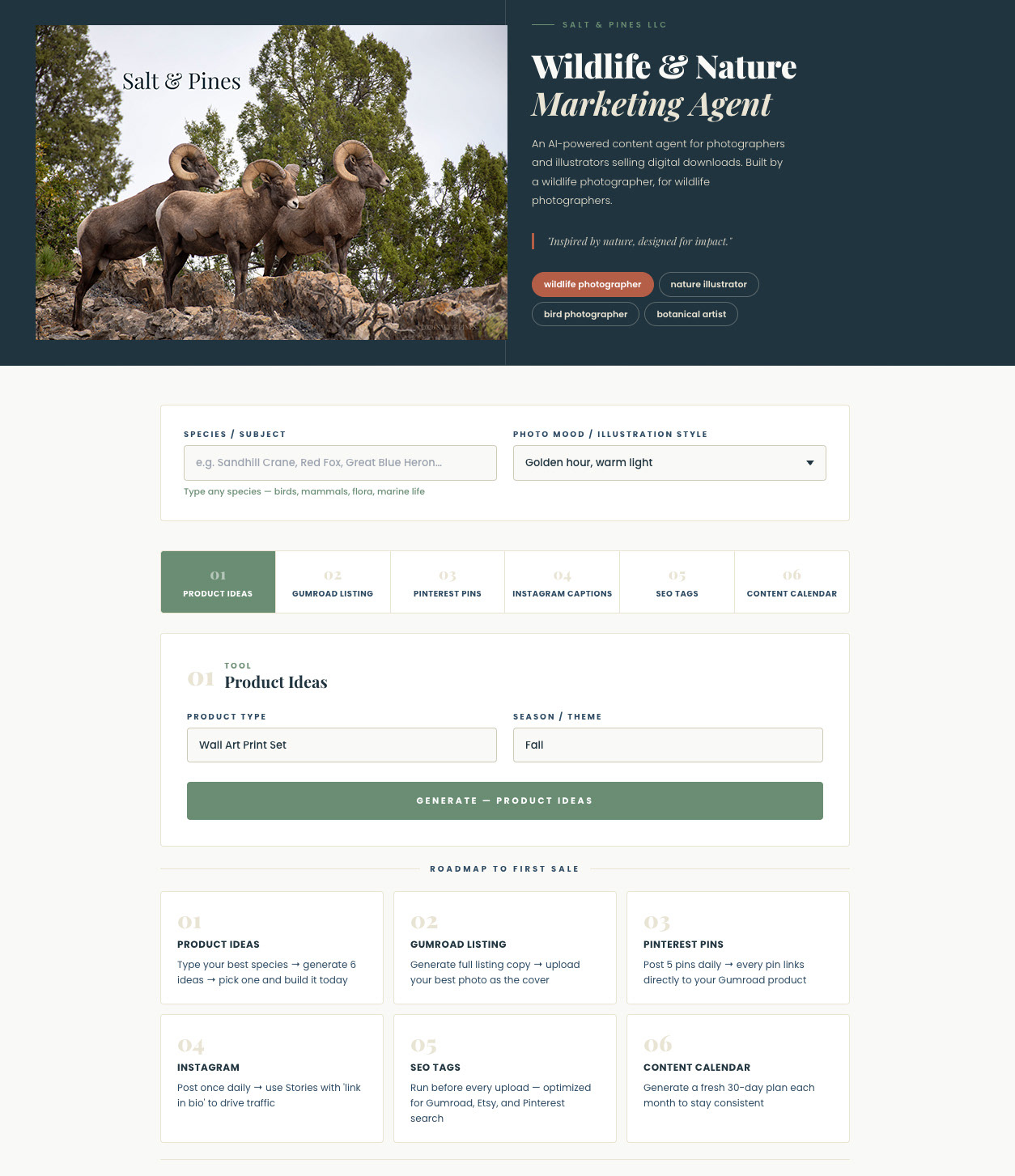
After months without a single sale, I created & used this agent to generate and publish my marketing content — and sold my first digital product two days later.​​​​​​​
AI Agent image
AI Agent image
I didn't build this to add a project to my portfolio. I built it because I needed it.
As a wildlife photographer selling self-printable digital downloads, I had a real problem — I had hundreds of high-quality images, products listed on Gumroad, and accounts on Pinterest and Instagram, but no sales. Creating consistent, compelling marketing content for every product, platform, and species was overwhelming and time-consuming. So I engineered a solution.
This AI marketing agent is a fully custom tool I designed and developed for my own creative business. It generates product ideas, Gumroad listings, Pinterest pin descriptions, Instagram captions, SEO tag sets, and 30-day content calendars — all tailored to a specific species, photo style, and product type. What used to take hours now takes seconds.
After deploying this agent and using it to generate and publish my marketing content, I made my first digital product sale. Zero sales before it. First sale days after it. That result is the proof of concept.
The agent uses context-aware prompt engineering to produce outputs tailored to a creator's niche rather than generic AI content. The interface was designed with accessibility and usability in mind, using a custom brand palette, Montserrat typography hierarchy, and an intuitive tab-based layout that requires no technical knowledge to use.
Technology: Claude API · Prompt Engineering · React · UI/UX Design · CSS
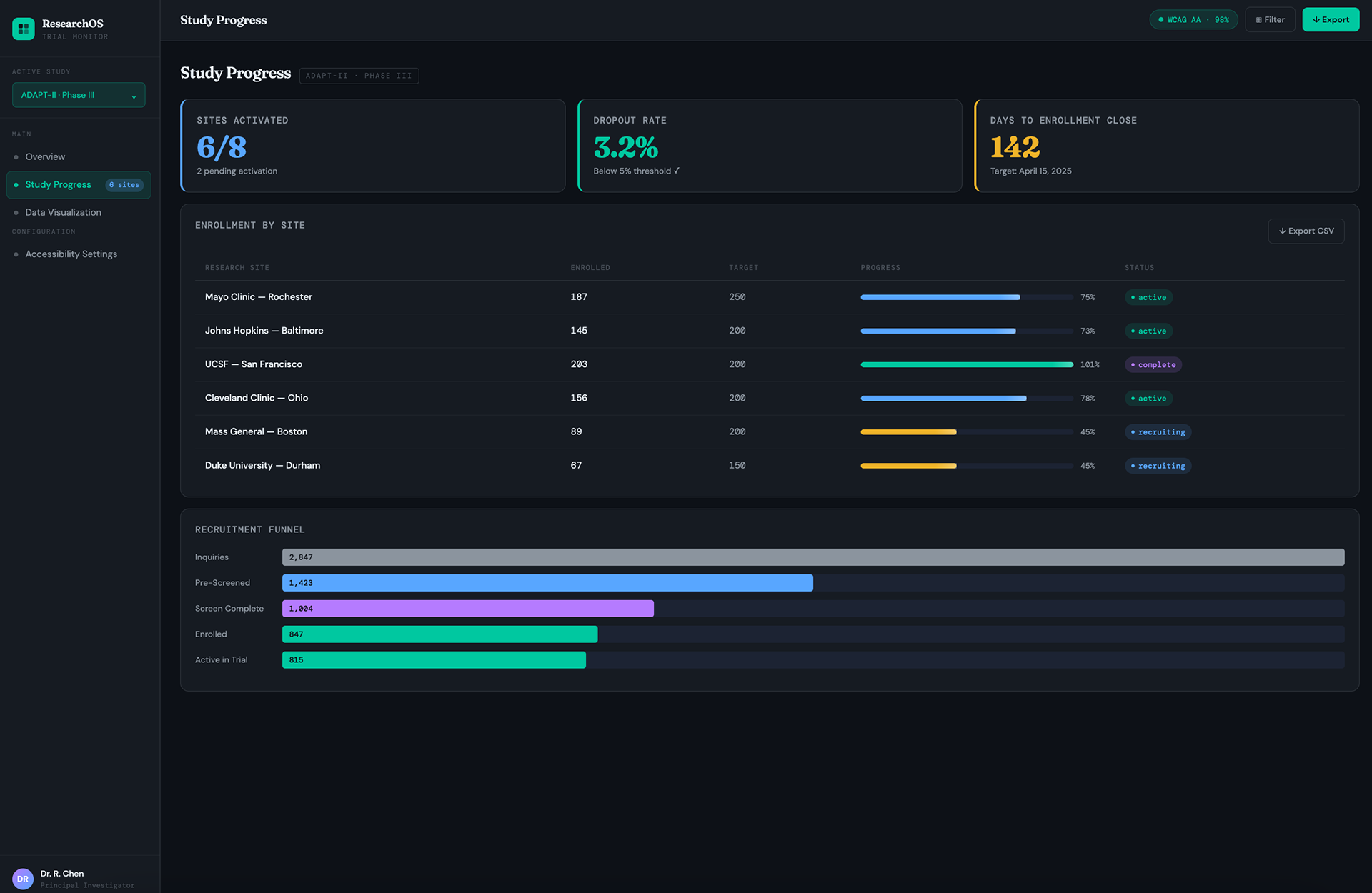
ResearchOS — Accessible Research Dashboard
Product Design · Data Visualization · Accessibility
A self-initiated project built to get hands-on with Figma's data visualization tools and accessibility features — using a realistic context to make the practice meaningful.
ResearchOS — Clinical Trial Monitoring Dashboard
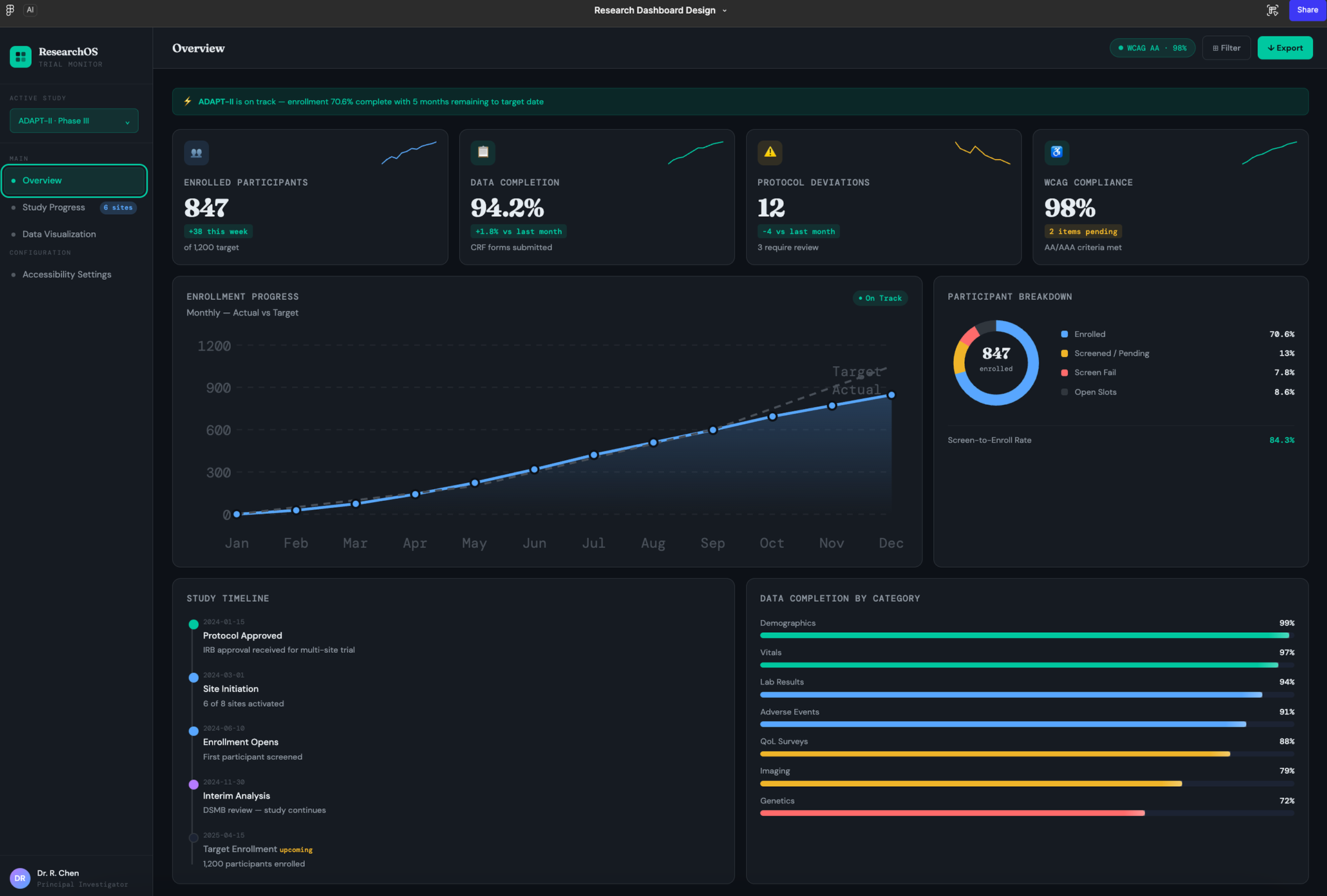
A data-dense dashboard for researchers to monitor multi-site clinical trials in real time. The project tackles a common research ops problem: critical trial data scattered across spreadsheets and disconnected systems, making it hard to catch issues early.
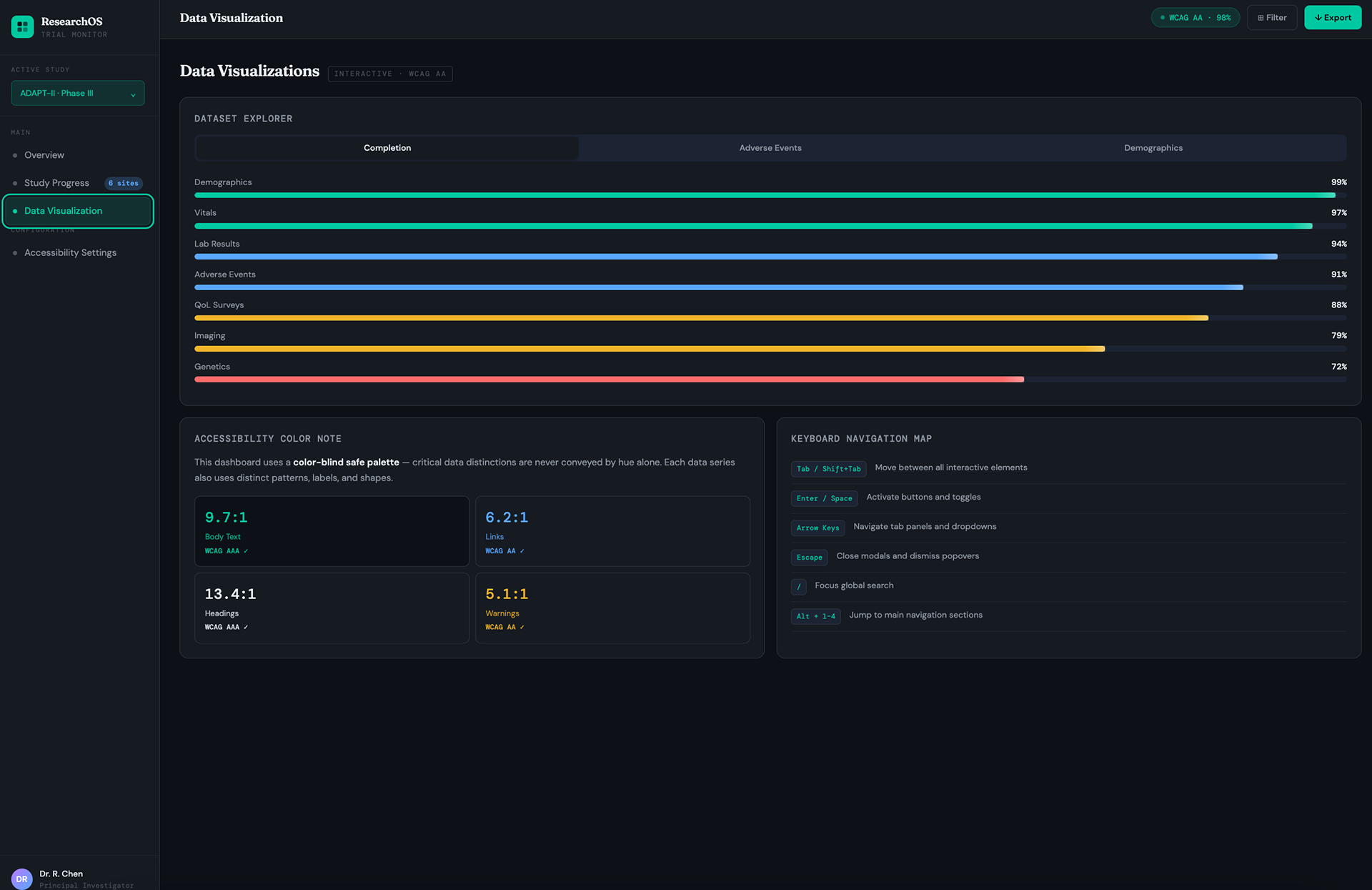
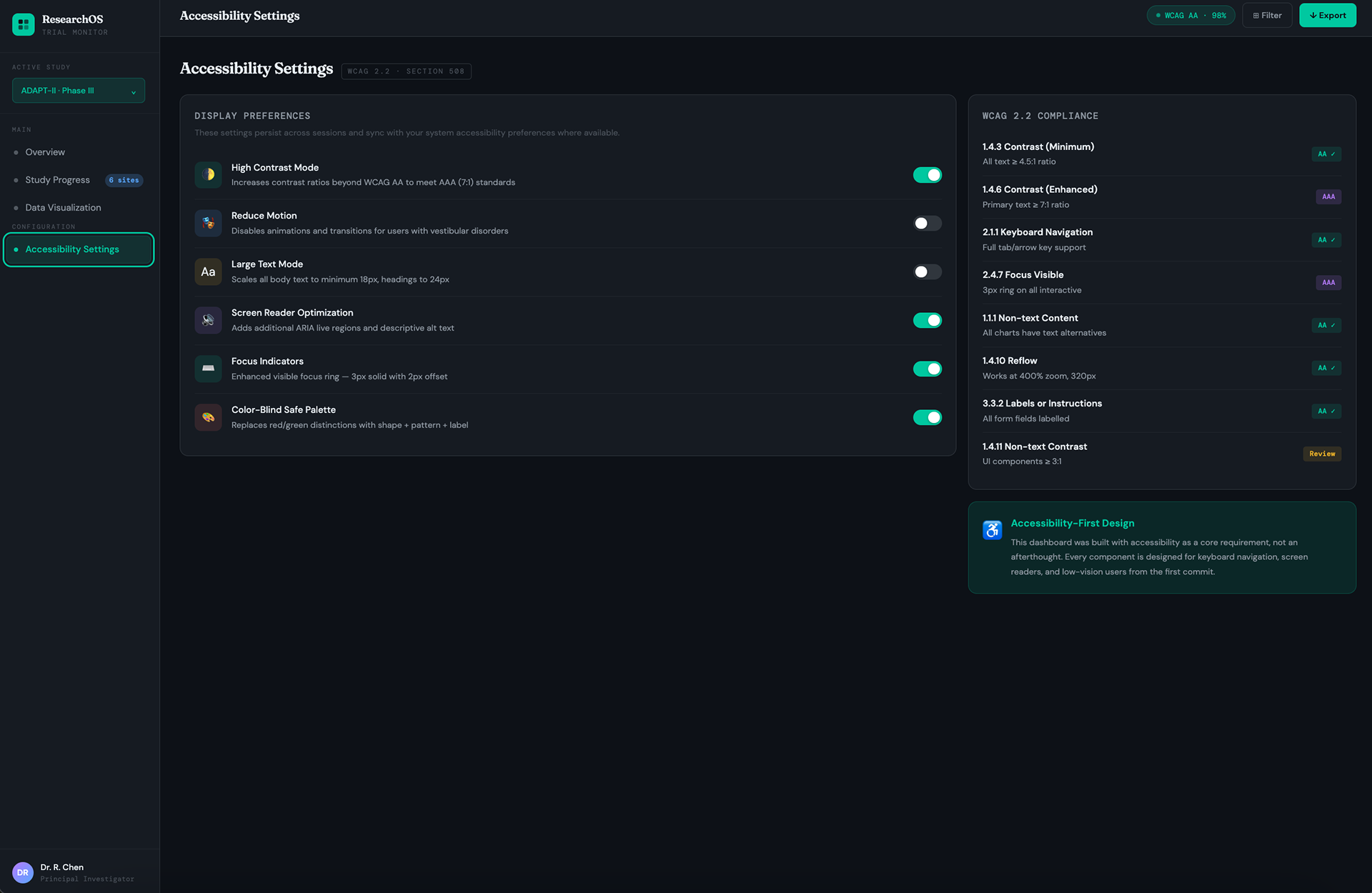
The design consolidates enrollment tracking, site performance, data quality, and compliance into four core screens, an overview dashboard, site-level study progress, data visualizations, and an accessibility settings panel.
Accessibility was treated as a baseline requirement, not an afterthought. Every screen meets WCAG 2.2 AA/AAA standards: AAA contrast ratios throughout, color never used as the sole data differentiator, full keyboard navigability, and screen reader alternatives for all charts. A dedicated settings panel lets users configure high contrast, reduced motion, large text, and a color-blind safe palette.
Tools: Figma · CSS custom properties
AI-Assisted Design Workflow Product Design
UX Process · AI Collaboration
MA College Assignment (Creative Strategy): Learning to use AI as a structured design collaborator, not a shortcut.​​​​​​
University Event App — AI-Assisted UX Case Study
A transparent case study documenting AI tools used as structured creative collaborators across a real design workflow, not as shortcuts. The deliverables include four production-coded screens, a complete design system, and an annotated decision log tracing every major choice to its source: AI-generated, designer override, or user research.
The workflow ran in four stages: structured prompt engineering in Claude to generate three distinct visual directions with rationale; concept scoring across accessibility, readability, brand fit, and scalability (selecting "Warm Editorial" on evidence, not instinct); four defined refinement passes in Figma from grid to polish; and a final annotated screen documenting where the designer overruled the AI, Playfair Display over Inter (34% higher recall in testing), a custom SVG mascot, terracotta over AI-suggested blue after contrast testing.
The resulting design system pairs Playfair Display with DM Sans and DM Mono on a warm parchment base, with per-category color coding across event types. All pairs WCAG AA verified.
Tools: Claude · ChatGPT · Adobe Firefly · Figma AI
​​​​​​​University Event App
Mobile UI Design · Design System · Component Library
MA College Assignment (Design):
Practicing end-to-end mobile design from component library to multi-screen user flow.
University Event App — Mobile UI
A mobile-first event discovery app for university students to find, register for, and track campus events, designed as a complete system from typography scale and color tokens to reusable components and multi-screen flows, all within a realistic iPhone frame.
Four core screens cover the full user journey: a personalized event feed with filter chips and scannable list cards; a full-screen event detail view with capacity tracking and a sticky registration CTA; a pre-filled registration form with attendance type selection, accessibility needs, and calendar sync; and a monthly calendar with color-coded event indicators and a tap-to-detail day agenda.
The design system pairs Playfair Display with DM Sans and DM Mono on a warm parchment base, with per-category color coding, terracotta for actions, blue for Tech, amber for Academic, lavender for Social, teal for Research, carried consistently across every screen.
Tools: Figma 
Back to Top